There is a Lavish Luck Casino app in both the App Store and Google Play. You can install the native app, or you can still use the browser version. Either way, the same account works across mobile and desktop.
New users can claim a welcome bonus of 20,000 Gold Coins and 0.3 Sweeps Coins. From there, the app opens up a slots-first library with more than 200 games, daily login rewards, daily missions, table games, and live dealer options. In this guide, we will show you how to install Lavish Luck on Android and iPhone.
Get up to 4.4M Gold Coins + 200 SC FREE!
Lavish Luck Highlights
- Expect games from premium studios
- More than 200 casino-style games
- Regular promos, including a generous daily login bonus
Lavish Luck app review
Unlike many sweepstakes casinos that still rely exclusively on mobile browsers, Lavish Luck offers dedicated apps for both Android and iOS devices.
That means you can install the platform directly from the official app stores instead of creating browser shortcuts or using web-based workarounds.
Android users can download
Lavish Luck Slots
through Google Play, while iPhone and iPad users can install Lavish Luck Casino from the App Store.
Installation takes only a few minutes, and the apps are ready to use immediately after you sign in.
The mobile apps replicate the desktop experience as closely as possible. Your account, Gold Coins, Sweeps Coins, game history, promotions, and rewards sync automatically across all devices, so you can switch between desktop and mobile without losing any progress.
Navigation is simple and intuitive, with clearly organized menus that make it easy to browse games, claim bonuses, access promotions, or manage your account.
The apps are optimized for touchscreens, so games scale well on both smartphones and tablets.
Another advantage is support for native mobile features. Depending on your device, you can enable biometric authentication through Face ID, Touch ID, or fingerprint recognition for faster logins.
Push notifications can also alert you when new promotions, daily rewards, or special events become available.
Because the mobile apps provide access to both Gold Coin social casino play and Sweeps Coin promotional gameplay, they function as much more than standalone slot apps.
They’re essentially a portable version of the entire platform, including the same redemption system explained in our
Lavish Luck redemption guide.
| 📱 App Information |
🤖 Lavish Luck Slots (Android) |
🍎 Lavish Luck Casino (iOS) |
| Download link |
Google Play |
App Store |
| Store rating |
4.5/5 |
4.7/5 |
| App size |
Varies by device |
128.5 MB |
| Minimum operating system |
Android 8.0+ |
iOS 15.0+ |
| iPad and tablet support |
Yes |
Yes |
| Biometric login |
Fingerprint authentication |
Face ID and Touch ID |
| Push notifications |
Yes |
Yes |
| Shared GC and SC balances |
Yes |
Yes |
| Desktop synchronization |
Automatic |
Automatic |
| Access to all promotions and games |
Full access |
Full access |
Social Casino Signup Promo
Get up to 4.4M Gold Coins + 200 SC FREE!
T&Cs and 18+ apply
Get bonus now
20,000 Gold Coins + 0.3 SC FREE
T&Cs and 18+ apply
Get bonus now
Social Casino Daily Bonus
Get up to 100K GC + 0.3 SC
T&Cs and 18+ apply
Get bonus now
How to install Lavish Luck on Android step by step
This section is clearly explained so you can follow the steps and install the App while holding your phone in one hand.
-
Open the official Lavish Luck site or Google Play listing on Android.
The best way is to start from the official Lavish Luck site and tap through to Google Play, or search directly for Lavish Luck Slots in Google Play.
Use the on-page banners in this article, as this helps you avoid unrelated lookalike listings and takes you straight to the official Android app.
-
Install the app and let it finish loading.
Tap Install and wait for the download to complete.
Once the app is on your device, open it and give it a few seconds to load fully. Be patient, as it must load fully.
This helps the app pull in the current lobby, rewards panels, and sign-in flow cleanly.
-
Sign in or create your account.
If you already have a Lavish Luck account, sign in using your usual details.
If you are new, register first so the app opens into your account properly, and your bonuses are tied to the right profile.
New users can claim 20,000 Gold Coins and 0.3 Sweeps Coins as the welcome bonus, so get the app set up properly before you start browsing games.
-
Check that the app opens into the full lobby.
Once inside, confirm the app opens cleanly into the main lobby, not just a landing screen.
You should be able to browse Lavish Luck slots, rewards, and other featured games without needing to switch back into your browser. Once that’s done, the app is ready for normal use.
How to install Lavish Luck on iPhone step by step
iPhone installation is just as direct because Lavish Luck also has an App Store listing.
-
Open the official Lavish Luck site or search the App Store.
The best route is to start from the official site and use the App Store badge, or search the App Store for Lavish Luck Casino.
Use our on-page banners to get the native iPhone and iPad app instead of a browser shortcut.
-
Download and open the app.
Tap Get, complete the install, and open the app once it is ready. Give it a few moments to load the first time so the game lobby and sign-in flow appear properly.
-
Log in or register your account.
If you already play on Lavish Luck, just sign in and your account should carry across.
If you are brand new, create your account first so you can claim the
Lavish Luck welcome bonus
of 20,000 Gold Coins and 0.3 Sweeps Coins before you begin exploring the lobby.
There is no
Lavish Luck Casino real money
gameplay so you have to use these Gold Coins and Sweeps Coins to test the site.
-
Launch the app and confirm everything is working.
Once logged in, move through the lobby and confirm the app loads the games, reward panels, and bonus sections correctly.
Since Lavish Luck uses the same account across the app and desktop, the app should be like a full mobile extension of the platform.
![Lavishluck casino slots]()
Lavish Luck Casino slots
![Lavishluck casino mobile]()
Play on the go with Lavish Luck Casino on mobile
Lavish Luck Casino web app
If you’re not fond of downloading a mobile app because you don’t want to fill your storage space, or any other possible reason, you don’t actually need to download the Lavish Luck app to play on your phone.
Lavish Luck also works through a mobile-optimized website, giving you instant access from your browser on Android and iOS devices.
Simply open the Lavish Luck website in your preferred mobile browser and log into your existing account.
The mobile website offers the same experience you would find on the desktop site or in the mobile app.
There’s no download or installation time, and you can simply bookmark the site or add it to your home screen for quicker access later.
If you only want to play occasionally, the mobile website is arguably the easier option; regular players may prefer the dedicated app for quicker access.
How to Add Lavish Luck to Your Home Screen
If you prefer playing through the Lavish Luck mobile website rather than downloading the dedicated app, you can add the site to your phone’s home screen.
This creates an icon that works much like an app and lets you open Lavish Luck with a single tap.
iPhone and iPad
-
Open
Safari (or your preferred browser)
and visit the Lavish Luck website.
-
Tap the
Share
button at the bottom of the screen.
-
Scroll down and select
Add to Home Screen.
-
Edit the name if needed, then tap
Add.
-
The Lavish Luck icon will now appear on your home screen. Tap it whenever you want to access the casino.
Android phones and tablets
-
Open
Chrome
and go to the Lavish Luck website.
-
Tap the
three-dot menu
in the top-right corner.
-
Select
Add to Home screen
or
Install app, depending on your device.
-
Confirm the name and tap
Add
or
Install.
-
The Lavish Luck icon will appear alongside your other apps, giving you one-tap access to the mobile casino.
Can you use the Lavish Luck Casino app on an iPad or an Android tablet?
For sure! You can download the Lavish Luck mobile app from either the App Store if you have an iPad or the Play Store if you have an Android Tablet.
The experience will be the same as playing on an iPhone or Android smartphone, with the same game library, promotions, and opportunities to make redemptions.
Customer service will be the same, too!
Use the Lavish Luck app to claim the sign-up bonus
The great thing about downloading this app is that you will get to experience one of the hottest sweepstakes casinos of the moment.
Simply by signing up, you will be able to claim 20,000 Gold Coins and 0.30 SC, allowing you to start your gaming journey with more than 800 titles to choose from, including slots, table games, jackpots, arcade games, as well as shooting games!
Besides the no-deposit bonus, you will also get a massive first purchase bonus that can get you up to 4,400,000 Gold Coins and 210 Sweeps Coins!
The great thing about Lavish Luck is not precisely the welcome bonus, but the sheer amount of ways in which you can collect free coins thanks to the bonus variety you will find in this app!
| 💸 Lavish Luck no deposit bonus | 20,000 GC + 0.30 SC |
| 📆 Lavish Luck daily login bonus | Starting at 10,000 GC + 0.30 SC (1.7 SC after 7 days)
|
| 💰 Lavish Luck first purchase bonus | Up to 4.4M Gold Coins + 200 Free SC |
| 🗓 Welcome Bonus Expiry Date | 90 Days |
| 🎰 Playthrough requirements | 1x bonus amount |
| ❌ Restricted states | California, Connecticut, Delaware, Iowa, Idaho, Illinois, Indiana, Kentucky, Louisiana, Maine, Michigan, Montana, New Jersey, Nevada, New York, Oklahoma, Tennessee, and Washington |
Get up to 4.4M Gold Coins + 200 SC FREE!
Lavish Luck Highlights
- Expect games from premium studios
- More than 200 casino-style games
- Regular promos, including a generous daily login bonus
Other bonuses available on the Lavish Luck app
The Lavish Luck mobile app makes it easy to keep track of the bonuses and rewards available to existing players.
Once you’ve claimed the initial sign-up offer, you can continue using the app to check for daily rewards, complete missions, invite friends, and find other ways to collect Gold Coins and Sweeps Coins.
The app doesn’t have a completely separate bonus system from the desktop website. Instead, it puts the same promotions and account rewards in a mobile-friendly format, so you can check and claim them without opening your computer.
Here are some of the main offers you can access while using the Lavish Luck app:
| 🎁 Reward |
📱 How it works in the Lavish Luck app |
| 🎯 Daily Missions |
Complete simple tasks such as making spins or reaching betting targets to earn free SC. Missions typically reset every 24 hours. |
| 💰 Reward Back |
Earn additional SC through Lavish Luck’s Reward Back system, with rewards connected to GC purchases and subsequent redemptions. |
| 👥 Referral Bonus |
Invite friends through your personal referral link and earn up to 200,000 GC + 60 SC per qualifying referral. |
| ✉️ Mail-In Bonus |
Send a qualifying handwritten request by mail to receive 2 SC per approved request. |
| 📱 Newsletter & Social Media |
Keep up with Lavish Luck promotions, giveaways, challenges, and occasional reward codes. |
🎯 Daily Missions on the Lavish Luck App
Daily Missions are especially convenient on mobile because you can check your tasks whenever you open the app.
Missions refresh every 24 hours and can involve activities such as making a certain number of spins, winning a specific amount of SC, or making a qualifying coin purchase.
Rewards generally range from around 1 to 4 SC, depending on the mission. Once you’ve completed a task, the reward is credited according to the applicable promotion terms.
If you already play Lavish Luck regularly, checking the missions section each day is worthwhile because it gives you another way to earn rewards alongside the daily login bonus.
The Lavish Luck app also gives you access to the <strong>Reward Back</strong> feature. This works differently from a traditional instant cashback offer.
For every $1 spent on an eligible GC purchase, Lavish Luck allocates 101 SC: 1 SC is credited immediately, while the remaining 100 SC is placed into a reserve.
When you subsequently make a redemption, 10% of the reserved amount is returned as additional free SC.
Because Reward Back is connected to GC purchases and redemptions, it is an optional feature rather than a completely free bonus.
You can track the relevant rewards in your account in the mobile app.
👥 Lavish Luck Referral Bonus
The mobile app also makes it easy to access and share your personal Lavish Luck referral link. You can send it to friends through messaging apps, email, social media, or other channels directly from your phone.
Your referred player needs to sign up through your referral link and make qualifying purchases before you receive rewards.
The program has multiple tiers, with the maximum advertised reward reaching 200,000 GC + 60 SC per friend when the applicable spending requirements are met.
For example, a qualifying $30 purchase can earn you 50,000 GC + 10 SC, while a friend who reaches $500 in purchases can qualify for the maximum tier of 200,000 GC + 60 SC in total rewards.
You can’t complete the mail-in offer through the app, but you can use the app to manage the same Lavish Luck account associated with your request.
Eligible players can send a handwritten request to Lavish Luck and receive 2 SC per approved request. Each request must contain the information required by the current terms, including your legal name, account email address, residential address, and the required request statement.
Send requests to:
LAVISH LUCK PO Box #9301 Manchester, NH 03108
The AMOE is a separate mail-based promotion, so rewards won’t appear instantly simply because you’ve opened or used the app. Processing can take considerably longer than the app-based bonuses.
📱 Newsletter and Social Media Promotions
The Lavish Luck app is useful for regular players, but it isn’t the only place to look for promotions. Subscribing to the newsletter and following Lavish Luck’s social media accounts can help you find additional giveaways, challenges, and promotional offers.
Some social media promotions involve solving a puzzle or riddle and submitting your answer alongside your player ID. Selected participants may then receive a reward or promotional code.
Because these offers can change frequently, check the latest official posts rather than relying on an old code found elsewhere.
Can you win real money on the Lavish Luck Casino app?
Not exactly. You will never play with or for real money. As I discussed in most articles about Lavish Luck and other sweepstakes casinos, these operators operate under the sweepstakes model.
This means you’ll play with a virtual currency instead of real money, divided into Gold Coins (play for fun) and Sweeps Coins (can be redeemed for real cash prizes).
This might sound confusing, but to make things easier, you will play with a digital token called Sweeps Coins. Once you meet the redemption requirements, you can exchange this currency for real cash prizes.
These are the most important redemption requirements:
- Playthrough requirement –
You need to play 1x the amount of free Sweeps Coins you claim before being able to make any redemption.
- Minimum SC redemption –
Each time you want to redeem, you will need to make a minimum redemption of 100 SC.
Step-by-step guide on how to redeem
Here is a short list of the steps you need to take to make your redemptions!
-
Verify your account –
Complete the KYC steps and add your phone number; then you will receive an SMS with a link to upload a copy of your ID and proof of address.
-
Meet redemption requirements –
To activate the redemption window, you need to first complete the 1x playthrough requirement plus reach the minimum SC you need to obtain before redeeming.
-
Open the three-bar menu –
You can now click on the three-bar menu, where you will find the redemption button. Click on it, and it will take you to the redemption menu.
-
Choose your prize –
You can now choose a reward based on your SC won. If you reach 50 SC, you can redeem Gift Cards; if you reach 100 or more, you can redeem real cash prizes.
-
Choose a redemption method –
You will only be able to choose bank transfers, which can unfortunately take up to 30 days, although they usually take up to 10 days.
Is the Lavish Luck Casino app legit?
Of course it is! Fortunately, thanks to operating under the sweepstakes laws, Lavish Luck can operate in most of the US, unlike Online Casinos that are restricted in most of the US.
If you wish to know which states do not allow Lavish Luck to operate, here’s a table highlighting the states that impose restrictions or ban this operator from offering its services:
- California
- Connecticut
- Delaware
- Iowa
- Idaho
- Illinois
- Indiana
- Kentucky
- Louisiana
- Maine
- Michigan
- Montana
- New Jersey
- Nevada
- New York
- Oklahoma
- Tennessee
- Washington
Lavish Luck Casino app reviews
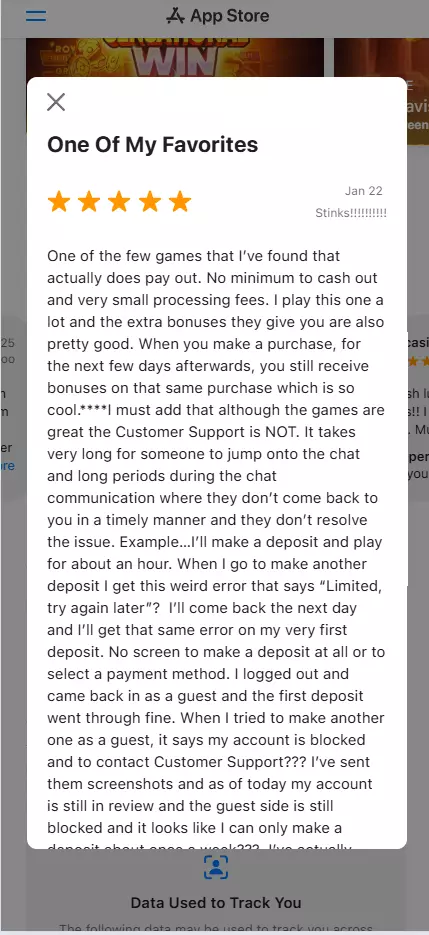
Lavish Luck has a strong rating on both the Google Play Store (4.5/5 from 8,968 user reviews) and the Apple App Store (4.8/5 from more than 90,000 ratings).
One common theme in most positive reviews is confusion around terms and services, with some complaints about the app blocking users who try to make several redemptions in one day.
Another issue I found is people trying to create a second account because they had a payment issue with their main account and then got banned.
As always, I find it vital for users to read the key terms and conditions to avoid these bad experiences, since any experienced player already knows you can’t create multiple accounts (even if it’s because you think you can fix an issue that way).
Other than that, most reviews are really happy with the app, but I thought it was worth mentioning this issue some people run into on their journey, so again, please read the T&Cs!
What the Lavish Luck Casino app offers
Lavish Luck is heavily slot-led. It offers more than 200 games and more than 200 providers, with slots as the headline attraction.
We saw Hold and Win content, Megaways titles, jackpot-led games, and a mix of themed slot categories such as buffalo slots, Cleopatra slots, magic slots, Book of Ra slots, free slots, penny slots, and Vegas-style slots.
The named games alone give a good sense of the variety. Lavish Luck top titles include:
- Big Fortune
- 3 Hot Chillies
- Super Hot Teapots
- 3 Carts of Gold: Hold and Win
- Energy Joker: Hold and Win
- Fortune Zombie
- 3 Pots Riches Extra: Hold and Win
- Coin Strike: Hold and Win
- Cash Express
- Aztec Fire 2
- Coin Up
- 3 Coin Volcanoes
- 3 China Pots
- Mega Fishing
- 3 Luxor Pots: Hold and Win
- Diamonds Power: Hold and Win
- Buffalo Power 2: Hold and Win
The app also offers jackpots, tournaments, and leaderboard-style activities, and because any Sweeps Coins you win carry light playthrough, it sits comfortably among the
best low wagering no deposit casino bonuses.
There is also more to the app than just reels, as the Lavish Luck app includes table games and live dealer games, so you are not locked into slots all the time.
But if you want a sweepstakes casino app with a broad slot catalog and regular reward activity, download the Lavish Luck app.
Lavish Luck Social Casino Promo
Get up to 4.4M Gold Coins + 200 SC FREE!
What to do after you install the Lavish Luck Casino app
Once you download the Lavish Luck app, here’s what you can do;
🎉 Claim the welcome bonus first
Once the app is installed and your account is live, claim the welcome bonus of 20,000 Gold Coins and 0.3 Sweeps Coins.
That gives you the correct starting point for
Lavish Luck Casino free play,
as it lets you move straight into the lobby.
💰 Learn the two virtual currencies quickly
Lavish Luck uses Gold Coins and Sweeps Coins. Gold Coins are for standard social casino entertainment play.
While you won’t find any
free spins reward code for Lavish Luck Casino, Sweeps Coins are tied to the sweepstakes play of the platform and can be redeemed for real-world prizes when eligible.
This is the standard sweepstakes casino structure.
🎁 Use the daily rewards properly
Lavish Luck is not built around the welcome bonus alone. In our
Lavish Luck review, we saw daily login rewards, daily missions, and other recurring offers.
If you only log in at random, you will miss much of the routine bonuses the app is designed to deliver.
🎮 Browse the game categories
With more than 200 games on offer, the best way to get the most from the Lavish Luck app is to use its categories properly.
If you like Hold and Win mechanics, go straight to those. If you want jackpot-style content, look for the games pushing those prize panels.
For more traditional slot themes, start with categories like buffalo, Book of Ra, Cleopatra, or Vegas-style games. That is much more efficient than opening random titles.
Pros and cons of using the Lavish Luck Casino app
With native apps available, Lavish Luck is a perfect on-the-go sweepstakes casino gaming platform for mobile players. Here are the upsides and downsides of being a Lavish Luck Casino player:
Pros and Cons
- Native apps on Android and iPhone
- Same account across app and desktop
- Broad game library with daily rewards
- Game range is mostly slots
Lavish Luck Casino app: Final thoughts and your next move
If you want a Lavish Luck app, you have access to one. The brand now supports both Android and iPhone through native store listings, and that makes mobile play much easier than the browser-only setup used by some other sweepstakes casino brands.
Add in the same cross-device account, the 20,000 Gold Coins and 0.3 Sweeps Coins welcome bonus, and a slot library of more than 200 games, and the mobile pitch is great enough.
Remember that you’ll be using the Lavish Luck account across desktop and the native app, the same rewards structure, and the same sweepstakes casino model.
If you are ready, head to the Lavish Luck registration page through our on-page banners, create your account, install the app on Android or iPhone, and claim the full welcome bonus before you start browsing the game lobby.
Get up to 4.4M Gold Coins + 200 SC FREE!
FAQs on Lavish Luck Casino app
📲 Is there a Lavish Luck app in the App Store or Google Play?
Yes. Lavish Luck has app access on both major stores. Android users can install the app through Google Play, while iPhone and iPad users can install it through the App Store. The same account works across app and desktop.
📱 How do I install Lavish Luck on Android?
Open the official Lavish Luck site or search for Lavish Luck Slots in Google Play, install the app, open it, then sign in or create an account. Once your account is set up, you can claim the welcome bonus of 20,000 Gold Coins and 0.3 Sweeps Coins and start using the full mobile lobby.
🍎 How do I install Lavish Luck on iPhone?
Open the official Lavish Luck site or search for Lavish Luck Casino in the App Store, download the app, then log in or register your account. After that, the app should open into the full Lavish Luck lobby with the same account access and rewards structure you get on desktop.