The FanDuel gift card is available via Play+, one of the most secure prepaid card companies in the world. With your loaded card, you can enjoy more secure deposits and quicker withdrawals compared to other payment methods.
What’s more, you can use your Play+ prepaid card to fund your account and play on any of FanDuel’s platforms, depending on what is available in your state. From daily fantasy sports to sports betting and casino – FanDuel has a range of options. Below, you can find out how to get a card and how to use it.
New Users – Get $250 in Bonus Bets when you wager $5 for 5 days
FanDuel Highlights
- Well-known company
- Excellent range of markets
- Clever site design
Gambling Problem? Call 1-800-GAMBLER or 1-800-MY-RESET. Call 1-888-789-7777 or visit ccpg.org/chat (CT). Hope is here. GamblingHelpLineMA.org or call (800) 327-5050 for 24/7 support (MA). Visit www.mdgamblinghelp.org (MD). Call 1-877-8HOPE-NY or text HOPENY (467369) (NY). 21+ (18+ D.C., KY, WY) and present in select states (for KS, in affiliation with Kansas Star Casino). First online real money wager only. Min $5 wager required for 5 consecutive days.$5 first deposit required. Bonus issued as nonwithdrawable bonus bets which expire 7 days after receipt. Restrictions apply. See terms at sportsbook.fanduel.com. Call 1-877-770-7867 (LA). ™/© 2026 MLB
What is the FanDuel sportsbook gift card?
Like many sportsbooks and
online casinos, FanDuel offers its own branded prepaid card via Play+. Effectively, this is a card that you can preload with cash and then use to fund your FanDuel sportsbook, online casino or DFS account.
You can also withdraw your winnings directly to the card, with the
FanDuel withdrawal time
being quicker than for most other payment methods available. Additionally, with a Play+ card, you can also spend your winnings directly – it also works just like a standard debit card, so you don’t have to move the money to your bank account first.
Unfortunately, Play+ is restricted in Connecticut, the Mohegan Sun Reservation, and Iowa. But if you are not in the regions and live in a state where FanDuel is permitted, you are able to use this method.
Currently, on the FanDuel FAQ section, it suggests that there are more gift card options, but this is incorrect. Here at TGT, we like to do in-depth research so that you all have the most up-to-date information. We have spoken to FanDuel regarding this and are able to provide you with the confirmation below:
![]()
FanDuel withdrawal methods confirmation
![]()
FanDuel prepaid card confirmation
New Users – Get $250 in Bonus Bets when you wager $5 for 5 days
T&Cs and 21+ apply
Get bonus now
Gambling Problem? Call 1-800-GAMBLER or 1-800-MY-RESET. Call 1-888-789-7777 or visit ccpg.org/chat (CT). Hope is here. GamblingHelpLineMA.org or call (800) 327-5050 for 24/7 support (MA). Visit www.mdgamblinghelp.org (MD). Call 1-877-8HOPE-NY or text HOPENY (467369) (NY). 21+ (18+ D.C., KY, WY) and present in select states (for KS, in affiliation with Kansas Star Casino). First online real money wager only. Min $5 wager required for 5 consecutive days.$5 first deposit required. Bonus issued as nonwithdrawable bonus bets which expire 7 days after receipt. Restrictions apply. See terms at sportsbook.fanduel.com. Call 1-877-770-7867 (LA). ™/© 2026 MLB
How to purchase a FanDuel gift card
FanDuel gift cards are Play+ cards. These act like a prepaid debit card and can be linked directly to your FanDuel wallet and can be used for both deposits and withdrawals.
You can sign up online and receive a virtual card almost instantly and a physical card can be sent later on, please follow the steps below to get started:
-
Log in to your FanDuel account
– Visit the official FanDuel website, click on the “Log In/Join” button in the top right hand corner. Enter your details to sign in then select the profile icon which will take you to your account settings.
-
Go to the Deposit section
– Now from your account settings select the “Deposit” option, this will bring up a list of payment options available for you and your location.
-
Select Play+ Prepaid Card
– From this list of options scroll through and select the Look Play+ Prepaid Card option which is towards the bottom. When you select it click the options to begin the set up process.
-
Register for a Play+ account– Next you will be redirected to a secure form hosted by Play+. Here you need to fill in your details, such as name, email etc. Once completed make sure you accept any terms and conditions to create your account.
-
Add a funding source to your card
– Now that your Play+ account has been set up, from the Play+ platform, you will need to add a funding source such as a debit card or bank account.
-
Receive your virtual card and start using it– Finally, now the set up is all complete you will have received a virtual Play+ card. Now you can head back to the FanDuel site and being using it.
How to make a deposit with a Play+ card
Once you are all set up, making a deposit with your Play+ gift card is very straightforward. My one tip on this would be to just double check your funding method is set up correctly as since January 2021, some banks do not accept card deposits for real money gaming sites.
-
Log in to your FanDuel account
– Visit the official FanDuel website, click on the “Log In/Join” button in the top right hand corner. Enter your details to sign in then select the profile icon which will take you to your account settings.
-
Go to the Deposit section
– Now from your account settings select the “Deposit” option, this will bring up a list of payment options available for you and your location.
-
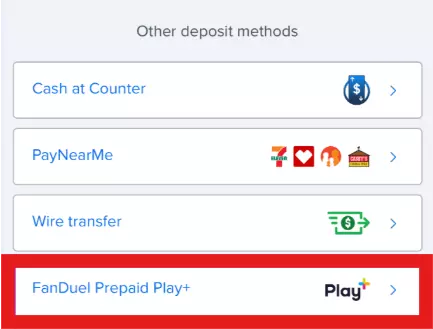
Select Play+ Prepaid Card
– From this list of options scroll through and select the Look Play+ Prepaid Card option which is towards the bottom.
-
Enter your deposit amount
– Next enter the amount you wish to deposit in the box on the screen, this will take the funds from your Play+ card and add them directly to FanDuel.
-
Press confirm
– Double check that the amount is correct and press confirm. This will confirm the Play+ card transaction and the funds will be added to your FanDuel account to use, you are able to check this by heading back to your profile (or by selecting the profile icon) and you will be able to see the amount under playable balance.
FanDuel gift card withdrawal
As I have touched on earlier, FanDuel allows users to withdraw their winnings using a Play+ gift card. This is one of the faster and more reliable ways of withdrawing your winnings. The Play+ card acts like a prepaid debit which is linked directly to your FanDuel account, hence being able to withdraw to it (unlike other prepaid cards). You are only able to withdraw to Play+ if you initially made the deposit using it. Once the withdrawal is complete the amount you requested will be available on your FanDuel account instantly which you can then use again on the site or in places which accepts Discover® or ATMs that allow cash withdrawals.
If you were wondering exactly how to do this, here is a very useful guide:
-
Log in to your FanDuel account
– Visit the official FanDuel website, click on the “Log In/Join” button in the top right hand corner. Enter your details to sign in then select the profile icon which will take you to your account settings.
-
Go to the Withdrawal section
– From the account menu select “Withdraw”, this will show you your current balance and any available payout options.
-
Select Play+ as your withdrawal method
– From the list of options, find and select “Play+.” This will only be available if you previously deposited using Play+ and if you are struggling to find it, scroll down as it tends to be towards the end.
-
Enter your withdrawal amount
– Next simply type in the amount of money you want to move from FanDuel back to your Play+ card.
-
Confirm the withdrawal request
– Now double check the amount and that everything looks correct and press confirm to submit your withdrawal request.
-
Wait for approval
– Like with any withdrawal request, it has to be approved but this is typically quite quick. Once it is approved the money will be added to your Play+ balance which can be used again on FanDuel or you are able to spend this where Discover is accepted.
How long do gift card withdrawals take?
It can take up to 48 hours for your first Play+ card withdrawal request to be approved, but in fairness, it’s often much quicker. Your first withdrawal always takes longer due to essential verification processes, but subsequent transactions are much faster.
Once the initial approval is complete, you should receive the funds on your Play+ card within an hour. For comparison, bank transactions can take up to five business days and check withdrawals take up to 14 days to reach your account, so all in all, Play+ is much more efficient.
![]()
FanDuel new customer bonus
![FanDuel Sport Live Ohio]()
FanDuel live sports
Can I use a Visa gift card on FanDuel?
An alternative to using the FanDuel gift card directly is the Visa gift card. You can get these at the counter of many retail stores in the US, and they can be used to deposit funds into your FanDuel account the same way as you would use a regular Visa credit or debit card. The same cards work well beyond FanDuel too, as you can see from our roundup of the
best online casinos that support Visa gift cards.
Every Visa gift card comes with a 16-digit card number and a three-digit security code. Therefore, to fund your account with one of these, you just need to follow the credit/debit card instructions as outlined in my
FanDuel online casino reviews.
FanDuel vs Visa gift card – A comparison
Before we round things up, here is a direct comparison of the FanDuel Play+ card and the Visa gift card option:
| FanDuel Play+ Card | Visa Gift Card |
| Pros | Cons | Pros | Cons |
| | - Compatible on multiple betting sites
| - Withdrawals are not possible
|
| - Can’t be used on any other betting site
| - Accepted by most merchants
| |
What other payment methods are available at FanDuel?
While FanDuel gift cards are a great
payment method, they are not the only method available. Each method will come with its own pros and cons, so to save you some time, I have outlined the other options below. And if you play casino as well as bet, it’s worth seeing which
no deposit instant withdrawal Cash App casinos
are worth a look:
| Method | Information | Deposit | Withdraw |
| Online Banking | You are able to connect your bank account through Trustly which offers secure deposits and withdrawals for most US banks | ✅ | ✅ |
| Debit Card | Just like with any other online purchase you are able to use either a Visa or Mastercard debit card. | ✅ | ✅ |
| Credit Card | Credit cards can be used for deposits on in most states, but restrictions apply. It is always best to check directly at the time of depositing as state regulations can change over time.
| ✅ | ❌ |
| Venmo | You can link your Venmo to deposit and withdraw but note that it is not available in Connecticut or Tennessee. | ✅ | ✅ |
| Apple Pay | If you are an iOS user you can use Apple Pay to make quick deposits using your linked debit or credit card through a secure digital wallet.
| ✅ | ❌ |
| PayPal | If you prefer not to share your bank details directly you can use PayPal as an e-wallet. But again, this is unavailable in Connecticut or Tennessee. | ✅ | ✅ |
| PayNearMe | PayNearMe allows you to deposit using cash at participating retailers such as 7-Eleven or CVS. It creates a barcode and when you take it to the store you can deposit in person. | ✅ | ❌ |
| Wire transfer | Wire transfers can be used for deposits and while they are secure they can be slower and can have fees associated with it. | ✅ | ❌ |
| Check | You are able to request a paper check to be mailed for withdrawal requests but do note that this can take 7-10 business days | ❌ | ✅ |
| Cash at Counter | As with a traditional in person casino, you are able to deposit or withdraw in person at select locations. | ✅ | ✅ |
FanDuel gift card online – Pros and cons
Here are the main pros and cons of using a FanDuel gift card for your online gambling and/or fantasy sports account:
Pros and cons
- Easy to set up- You can create your Play+ account directly through FanDuel and get access to your virtual card.
- Quick withdrawal- Withdrawals to Play+ are typically processed within an hour after approval.
- Secure deposits – Play+ uses encryption which keeps your details safe and operates separately from your main bank account.
- Spend your winnings- Once you have made a withdrawal you can use the Play+ card anywhere Discover® is accepted or withdraw cash at ATMs without needing to transfer the money back to your bank.
- Separate cards for each betting brand- If you use multiple brands that operate with Play+ you will need an individual card for each one. This can cause a bit of headache when it comes to managing accounts across the board.
New Users – Get $250 in Bonus Bets when you wager $5 for 5 days
Wagering (WR):
New Users – Get $350 in Bonus Bets when you wager $5 for 7 days ($50 Bonus Bets per day)
Gambling Problem? Call 1-800-GAMBLER or 1-800-MY-RESET. Call 1-888-789-7777 or visit ccpg.org/chat (CT). Hope is here. GamblingHelpLineMA.org or call (800) 327-5050 for 24/7 support (MA). Visit www.mdgamblinghelp.org (MD). Call 1-877-8HOPE-NY or text HOPENY (467369) (NY). 21+ (18+ D.C., KY, WY) and present in select states (for KS, in affiliation with Kansas Star Casino). First online real money wager only. Min $5 wager required for 5 consecutive days.$5 first deposit required. Bonus issued as nonwithdrawable bonus bets which expire 7 days after receipt. Restrictions apply. See terms at sportsbook.fanduel.com. Call 1-877-770-7867 (LA). ™/© 2026 MLB
Conclusion – Buy a FanDuel gift card with Play+ today
At the end of the day, if you want to fund your account quickly and securely, then the FanDuel Play+ card is one of the best options around. Additionally, you get fast withdrawals and you can spend your winnings directly at many online and in-person retail and hospitality outlets.
While the Visa gift card is also a good choice for depositing, it does not offer withdrawals with FanDuel unlike the Play+ card. Which makes it arguably better for being versatile across their sportsbook, casino and other services they offer.
So if you live in an eligible state for FanDuel and you have been looking into gift card options, it is really easy to get started with setting up your Play+ card. If you are new to FanDuel why not click on one of the banners on this page to get started with a
FanDuel bonus
today.
For anyone considering trying out FanDuel, the platform is currently offering a $350 in Bonus Bets promotion to new users who deposit at least $10 and place a bet of at least $5 for 7 days, This offer went live on June 3, 2026, and available in all Fanduel participating states.
Sports Offer
New Users – Get $350 in Bonus Bets Guaranteed – When You Bet $5 for 7 Days!
Must be 21+ in NJ, PA, MI, or WV. $10 first deposit required. Bonus issued as non-withdrawable bonus bets which expire 7 days after receipt. Offer available in all SPO states. Restrictions apply. Contact 1-877-770-7867 (LA).
Gambling Problem? Call 1-800-GAMBLER or 1-800-MY-RESET. Call 1-888-789-7777 or visit [ccpg.org/chat](http://ccpg.org/chat) (CT). Hope is here. [GamblingHelplineMA.org](http://GamblingHelplineMA.org) or call (800) 327-5050 for 24/7 support (MA). Visit [mdgamblinghelp.org](http://mdgamblinghelp.org) (MD). Call 1-877-8HOPE-NY or text HOPENY (467369) (NY). 21+ (18+ DC, KY, WV). Void where prohibited. Gambling problem? Call 1-800-GAMBLER or visit [www.gamblersanonymous.org](http://www.gamblersanonymous.org).
Casino Offer
Deposit $10, Get 500 Bonus Spins & $50 In Casino Bonus
– Promo starts June 8, at 12 pm ET
– States: NJ, PA, MI
Must be 21+ and present in NJ, PA, or MI. $10 first deposit required. Bonus issued as non-withdrawable bonus spins and Casino Site Credit that expire 7 days after receipt. Bonus spins are received in increments of 50 and may only be used in the state of first deposit and on select games. Restrictions apply. See terms and eligible games at fanduel.com/casino. ©️ 2025 Light and Wonder. All rights reserved.
Gambling Problem? Call 1-800-GAMBLER.
New Users – Get $250 in Bonus Bets when you wager $5 for 5 days
Gambling Problem? Call 1-800-GAMBLER or 1-800-MY-RESET. Call 1-888-789-7777 or visit ccpg.org/chat (CT). Hope is here. GamblingHelpLineMA.org or call (800) 327-5050 for 24/7 support (MA). Visit www.mdgamblinghelp.org (MD). Call 1-877-8HOPE-NY or text HOPENY (467369) (NY). 21+ (18+ D.C., KY, WY) and present in select states (for KS, in affiliation with Kansas Star Casino). First online real money wager only. Min $5 wager required for 5 consecutive days.$5 first deposit required. Bonus issued as nonwithdrawable bonus bets which expire 7 days after receipt. Restrictions apply. See terms at sportsbook.fanduel.com. Call 1-877-770-7867 (LA). ™/© 2026 MLB
FanDuel gift card FAQ
✉️ Can you purchase FanDuel gift cards?
Strictly speaking, they are not called gift cards, but you can purchase a FanDuel-branded Play+ card online. Just go to the Play+ site, select FanDuel from the list of casino options and follow the instructions.
❓ Where to get a FanDuel gift card?
There are two places where you can get a FanDuel prepaid card. Firstly, you can go to the Play+ website, select your state and then choose FanDuel from the list of partners. Alternatively, you can choose “Play+” from the list of deposit options in your FanDuel account and set it up from there.
💸 Can you withdraw funds to a FanDuel prepaid card?
Yes, you can withdraw your funds back onto your FanDuel card. Additionally, you can also spend your winnings directly using the card at any retailer that accepts it. For more info, check out my guides and reviews thegruelingtruth.com.
💳 Can I use a Visa gift card instead?
Yes, you can deposit using a Visa gift card, but it’s limited to deposits only. The FanDuel Play+ card is the better choice if you want full deposit and withdrawal functionality.
📍 Are there any restrictions on using Play+?
Yes, the FanDuel Play+ card is not available in Connecticut, the Mohegan Sun Reservation, or Iowa. If you live outside these regions and FanDuel operates legally in your state, you can use Play+ without issue.